Ngoài quản lý WordPress qua giao diện trực quan thì bạn có thể quản lý WordPress bằng cách tiêu dùng các câu lệnh WP CLI , câu lệnh WP CLI sẽ rất hữu ích cho lập trình viên xử lý các sự cố khi không thể hoặc không muốn đăng nhập vào wp-admin thông qua giao diện bình thường.
Việc quản lý website WordPress thông qua câu lệnh cũng khá đơn giản mà chỉ cần vài phút làm quen bạn có thể hiểu và thao tác được, các thao tác cài đặt WP CLI và tiêu dùng bạn có thể tham khảo bài viết dưới đây.
WP-CLI là gì?
WP-CLI là tính năng được ra đời và phát triển từ những năm 2011 , với WP-CLI bạn có thể dễ dàng thao tác quản lý website WordPress của mình một cách đơn giản thông qua giao diện dòng lệnh (Command).
Với cách thức thông thường , khi các bạn cần cài đặt Plugins, Themes, hay chỉnh sửa liên quan đến WordPress các bạn cần phải truy cập vào trình quản trị WordPress và thực hiện các thao tác bằng cách click chuột nhưng với WP-CLI bạn chỉ cần gõ các dòng lệnh để thực hiện.
Cài đặt WP-CLI
Mặc định WP-CLI sẽ không được cài đặt mà bạn phải cài đặt thủ công vào máy chủ của bạn , nếu bạn tiêu dùng các dịch vụ Server/VPS nhưng chưa được cài đặt sẵn WP-CLI thì có thể thực hiện các bước sau đây để cài đặt.
1. Bạn cần đăng nhập vào SSH vào VPS của mình với quyền root
2. Sau khi đã SSH thành công các bạn cần chạy các lệnh sau:
curl -O https://raw.githubusercontent.com/wp-cli/builds/gh-pages/phar/wp-cli.phar
php wp-cli.phar --info
chmod +x wp-cli.phar
sudo mv wp-cli.phar /usr/local/bin/wp
Chúc thích lệnh:
1. Tải WP-CLI từ Github
2. Xác nhận tải thành công.
3. Phân quyền thực thi fille wp-cli.phar
4. Di chuyển WP-CLI đến phân vùng mà tất cả người dùng có thể tiêu dùng lệnh và đổi tên từ wp-cli.phar thành wp
Lý do bạn cần đổi wp-cli.phar thành wp là để trong quá trình tiêu dùng lệnh, bạn chỉ cần gõ wp thay vì wp-cli.phar
Cách tiêu dùng WP-CLI
Khi bạn cài đặt WP-CLI lên các máy chủ server/VPS và đang thực hiện thao tác với quyền root, thì khi tiêu dùng các lệnh của WP-CLI các bạn cần thêm vào option
--allow-rootphía sau dòng lệnh nếu không các bạn sẽ nhận được cảnh báo lỗi như phía dưới. Nếu các bạn đang tiêu dùng các dịch vụ Sharehost hoặc không phải thao thác từ user root thì bạn không cần phải thêm option này vào phía sau.
Error: YIKES! It looks like you're running this as root. You probably meant to run this as the user that your WordPress installation exists under.
If you REALLY mean to run this as root, we won't stop you, but just bear in mind that any code on this site will then have full control of your server, making it quite DANGEROUS.
If you'd like to continue as root, please run this again, adding this flag:  --allow-root
If you'd like to run it as the user that this site is under, you can run the following to become the respective user:
sudo -u USER -i -- wp
Bạn phải di chuyển tới thư mục gốc chưa website thì mới thao tác được lệnh WP-CLI nếu ở ngoài thư mục gốc chứa website WordPress thì sẽ nhận được thông tin như bên dưới. Trước khi thao tác với WP-CLI bạn phải dùng lệnh
cd /thu-muc-goc-chua-website-wp/
[root@vutruso ~]# wp --info --allow-root
OS:     Linux 4.18.0-305.19.1.el8_4.x86_64 #1 SMP Wed Sep 15 15:39:39 UTC 2021 x86_64
Shell:  /bin/bash
PHP binary:     /usr/local/lsws/lsphp74/bin/php
PHP version:    7.4.22
php.ini used:   /usr/local/lsws/lsphp74/etc/php.ini
MySQL binary:   /usr/bin/mysql
MySQL version:  mysql  Ver 15.1 Distrib 10.3.28-MariaDB, for Linux (x86_64) using readline 5.1
SQL modes:      STRICT_TRANS_TABLES,ERROR_FOR_DIVISION_BY_ZERO,NO_AUTO_CREATE_USER,NO_ENGINE_SUBSTITUTION
WP-CLI root dir:        phar://wp-cli.phar/vendor/wp-cli/wp-cli
WP-CLI vendor dir:      phar://wp-cli.phar/vendor
WP_CLI phar path:       /root
WP-CLI packages dir:
WP-CLI global config:
WP-CLI project config:
WP-CLI version: 2.5.0
Lệnh đánh giá phiên bản WP-CLI.
wp --info
wp --info --allow-root
OS:     Linux 4.18.0-305.19.1.el8_4.x86_64 #1 SMP Wed Sep 15 15:39:39 UTC 2021 x86_64
Shell:  /bin/bash
PHP binary:     /usr/local/lsws/lsphp74/bin/php
PHP version:    7.4.22
php.ini used:   /usr/local/lsws/lsphp74/etc/php.ini
MySQL binary:   /usr/bin/mysql
MySQL version:  mysql  Ver 15.1 Distrib 10.3.28-MariaDB, for Linux (x86_64) using readline 5.1
SQL modes:
WP-CLI root dir:        phar://wp-cli.phar/vendor/wp-cli/wp-cli
WP-CLI vendor dir:      phar://wp-cli.phar/vendor
WP_CLI phar path:       /home/bitches.vn/public_html
WP-CLI packages dir:
WP-CLI global config:
WP-CLI project config:
WP-CLI version: 2.5.0
[root@vutruso public_html]
Lệnh đánh giá danh sách các tính năng được tương trợ qua WP-CLI.
wp help
Như hình bên dưới các bạn có thể thấy WP-CLI tương trợ rất nhiều tính năng liên quan đến WordPress, để tiêu dùng tính năng nào các bạn chỉ việc gõ lệnh tương ứng: wp
NAME
  wp
DESCRIPTION
  Manage WordPress through the command-line.
SYNOPSIS
  wp
SUBCOMMANDS
  cache                 Adds, removes, fetches, and flushes the WP Object Cache object.
  cap                   Adds, removes, and lists capabilities of a user role.
  cli                   Reviews current WP-CLI info, checks for updates, or views defined aliases.
  comment               Creates, updates, deletes, and moderates comments.
  config                Generates and reads the wp-config.php file.
  core                  Downloads, installs, updates, and manages a WordPress installation.
  cron                  Tests, runs, and deletes WP-Cron events; manages WP-Cron schedules.
  db                    Performs basic database operations using credentials stored in wp-config.php.
  embed                 Inspects oEmbed providers, clears embed cache, and more.
  eval                  Executes arbitrary PHP code.
  eval-file             Loads and executes a PHP file.
  export                Exports WordPress content to a WXR file.
  help                  Gets help on WP-CLI, or on a specific command.
  i18n                  Provides internationalization tools for WordPress projects.
  import                Imports content from a given WXR file.
  language              Installs, activates, and manages language packs.
  maintenance-mode      Activates, deactivates or checks the status of the maintenance mode of a site.
  media                 Imports files as attachments, regenerates thumbnails, or lists registered image sizes.
  menu                  Lists, creates, assigns, and deletes the active theme's navigation menus.
  network               Perform network-wide operations.
  option                Retrieves and sets site options, including plugin and WordPress settings.
  package               Lists, installs, and removes WP-CLI packages.
  plugin                Manages plugins, including installs, activations, and updates.
  post                  Manages posts, content, and meta.
  post-type             Retrieves details on the site's registered post types.
  rewrite               Lists or flushes the site's rewrite rules, updates the permalink structure.
  role                  Manages user roles, including creating new roles and resetting to defaults.
  scaffold              Generates code for post types, taxonomies, plugins, child themes, etc.
  search-replace        Searches/replaces strings in the database.
  server                Launches PHP's built-in web server for a specific WordPress installation.
  shell                 Opens an interactive PHP console for running and testing PHP code.
  sidebar               Lists registered sidebars.
  site                  Creates, deletes, empties, moderates, and lists one or more sites on a multisite installation.
  super-admin           Lists, adds, or removes super admin users on a multisite installation.
  taxonomy              Retrieves information about registered taxonomies.
  term                  Manages taxonomy terms and term meta, with create, delete, and list commands.
  theme                 Manages themes, including installs, activations, and updates.
  transient             Adds, gets, and deletes entries in the WordPress Transient Cache.
  user                  Manages users, along with their roles, capabilities, and meta.
  widget                Manages widgets, including adding and moving them within sidebars.
Ví dụ bạn cần xem chi tiết các lệnh liên quan đến Plugin , trước hết các bạn nhấn phím Q để thoát khỏi giao diện trên và tiêu dùng lệnh tương ứng như sau:
wp plugin
Tại đây bạn sẽ được liệt kê các lệnh cụ thể được tương trợ với Plugin như: active, deactivate, delete, uninstall plugin..vv
[root@vutruso public_html]# wp plugin --allow-root
usage: wp plugin activate [<plugin>...] [--all] [--network]
   or: wp plugin auto-updates <command>
   or: wp plugin deactivate [<plugin>...] [--uninstall] [--all] [--network]
   or: wp plugin delete [<plugin>...] [--all]
   or: wp plugin get <plugin> [--field=<field>] [--fields=<fields>] [--format=<format>]
   or: wp plugin install <plugin|zip|url>... [--version=<version>] [--force] [--activate] [--activate-network] [--insecure]
   or: wp plugin is-active <plugin> [--network]
   or: wp plugin is-installed <plugin>
   or: wp plugin list [--<field>=<value>] [--field=<field>] [--fields=<fields>] [--format=<format>] [--status=<status>]
   or: wp plugin path [<plugin>] [--dir]
   or: wp plugin search <search> [--page=<page>] [--per-page=<per-page>] [--field=<field>] [--fields=<fields>] [--format=<format>]
   or: wp plugin status [<plugin>]
   or: wp plugin toggle <plugin>... [--network]
   or: wp plugin uninstall [<plugin>...] [--deactivate] [--skip-delete] [--all]
   or: wp plugin update [<plugin>...] [--all] [--exclude=<name>] [--minor] [--patch] [--format=<format>] [--version=<version>] [--dry-run] [--insecure]
   or: wp plugin verify-checksums [<plugin>...] [--all] [--strict] [--format=<format>] [--insecure]
See 'wp help plugin <command>' for more information on a specific command.
Một số câu lệnh thông dụng với WP-CLI
1. Cài mới 1 plugin bằng wp cli – update plugin bằng wp cli
Ví dụ bạn muốn cài đặt mới 1 plugin là wordpress-seo qua WP-CLI bạn có thể tiêu dùng lệnh (tên plugin là slug plugin: https://vi.wordpress.org/plugins/wordpress-seo/
wp plugin install wordpress-seo --allow-root
Sau khi cài xong bạn có thể active bằng lệnh:
wp plugin activate wordpress-seo --allow-root
Cài xong bạn ghét quá muốn deactive thì bạn dùng lệnh
wp plugin deactivate wordpress-seo --allow-root
Muốn xóa hẳn Yoast SEO bạn tiêu dùng câu lệnh
wp plugin uninstall wordpress-seo --allow-root
Ngoài ra một số câu lệnh khác mà thường dùng như:
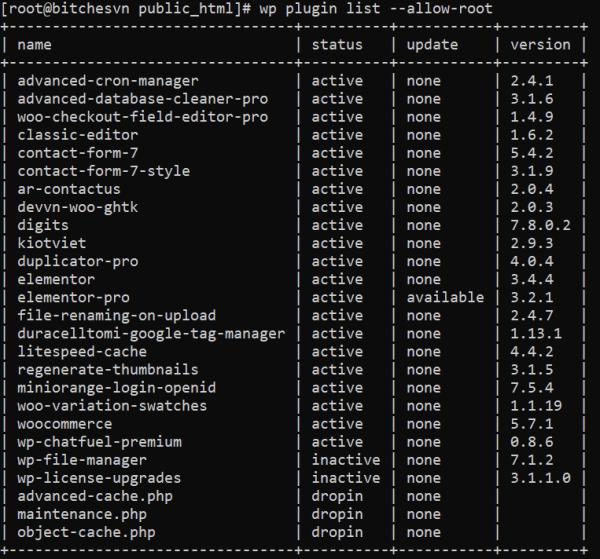
2. List toàn bộ plugin đang tiêu dùng cho website
wp plugin list --allow-root
Cập nhật toàn bộ plugin lên phiên bản mới nhất
wp plugin update --all
Hủy kích hoạt toàn bộ plugin
wp plugin deactivate --all
3. Check phiên bản WordPress bạn đang tiêu dùng
wp core version --allow-root
4. Cập nhật wp-core cho website
wp core update --allow-root
5. Check sum WordPress core
wp checksum core --allow-root
[root@vutruso public_html]# wp checksum core --allow-root
Success: WordPress installation verifies against checksums.
6. Xóa toàn bộ transient
wp transient delete –all --allow-root
7. Export database (sao lưu database) bằng wp cli
wp db export my_database_backup.sql --allow-root
8. Import database (khôi phục database) bằng wp cli
wp db import <file>
8. Tối ưu database bằng wp cli
wp db optimize --allow-root
9. Sửa lỗi WordPress bằng wp cli
wp db repair --allow-root
10. Cập nhật SITE URLs bằng WP CLI
wp option update home https://truongcongthang.com
wp option update siteurl https://truongcongthang.com
11. Lấy danh sách tất cả user trong website
wp user list --allow-root
12. Tạo user mới với quyền quản trị viên
wp user create VTS [email protected] --role=administrator --allow-root
Cập nhật thông tin tài khoản
wp user update vts --display_name=VUTRUSO--user_pass=vutruso_123pass --allow-root
Xóa thành viên
wp user delete vts --reassign=vts --allow-root
Thay đổi mật khẩu user
wp user update VUTRUSO --user_pass="NEW_PASSWORD" --allow-root
13. Lấy thông tin các theme đang tiêu dùng
wp theme list --allow-root
14. Cài đặt theme mới
wp theme install twentynineteen --allow-root
Active theme mới cài: wp theme activate twentynineteen --allow-root
15. Xóa cache với wp cli
wp-cli có thể thao tác với object-cache mà không đề nghị bất kỳ plugin riêng biệt nào.
Để nhanh chóng xóa bộ object-cache banjc so thể dùng lệnh
wp cache flush
16. Regenerate Thumbnails
wp media regenerate --yes --only-missing
17. Tìm kiếm và thay thế
wp search-replace 'https://old.blog' 'https://new.blog' --skip-columns=guid
Đầu ra sẽ như sau:
+----------------------------------+-----------------------+--------------+------+
| Table                            | Column                | Replacements | Type |
+----------------------------------+-----------------------+--------------+------+
| wp_actionscheduler_actions       | hook                  | 0            | SQL  |
| wp_actionscheduler_actions       | status                | 0            | SQL  |
| wp_actionscheduler_actions       | args                  | 0            | SQL  |
| wp_actionscheduler_actions       | schedule              | 0            | PHP  |
| wp_actionscheduler_actions       | extended_args         | 0            | SQL  |
| wp_actionscheduler_groups        | slug                  | 0            | SQL  |
| wp_actionscheduler_logs          | message               | 0            | SQL  |
| wp_commentmeta                   | meta_key              | 0            | SQL  |
| wp_commentmeta                   | meta_value            | 0            | SQL  |
| wp_comments                      | comment_author        | 0            | SQL  |
| wp_comments                      | comment_author_email  | 0            | SQL  |
| wp_comments                      | comment_author_url    | 0            | SQL  |
| wp_comments                      | comment_author_IP     | 0            | SQL  |
| wp_comments                      | comment_content       | 0            | SQL  |
| wp_comments                      | comment_approved      | 0            | SQL  |
| wp_comments                      | comment_agent         | 0            | SQL  |
| wp_comments                      | comment_type          | 0            | SQL  |
| wp_links                         | link_url              | 0            | SQL  |
| wp_links                         | link_name             | 0            | SQL  |
| wp_links                         | link_image            | 0            | SQL  |
| wp_links                         | link_target           | 0            | SQL  |
| wp_links                         | link_description      | 0            | SQL  |
| wp_links                         | link_visible          | 0            | SQL  |
| wp_links                         | link_rel              | 0            | SQL  |
| wp_links                         | link_notes            | 0            | SQL  |
| wp_links                         | link_rss              | 0            | SQL  |
| wp_options                       | option_name           | 0            | SQL  |
| wp_options                       | option_value          | 6            | PHP  |
| wp_options                       | autoload              | 0            | SQL  |
| wp_postmeta                      | meta_key              | 0            | SQL  |
| wp_postmeta                      | meta_value            | 36           | PHP  |
| wp_posts                         | post_content          | 425          | PHP  |
| wp_posts                         | post_title            | 0            | SQL  |
| wp_posts                         | post_excerpt          | 2            | SQL  |
| wp_posts                         | post_status           | 0            | SQL  |
| wp_posts                         | comment_status        | 0            | SQL  |
| wp_posts                         | ping_status           | 0            | SQL  |
| wp_posts                         | post_password         | 0            | SQL  |
| wp_posts                         | post_name             | 0            | SQL  |
| wp_posts                         | to_ping               | 0            | SQL  |
| wp_posts                         | pinged                | 0            | SQL  |
| wp_posts                         | post_content_filtered | 0            | SQL  |
| wp_posts                         | post_type             | 0            | SQL  |
| wp_posts                         | post_mime_type        | 0            | SQL  |
| wp_term_taxonomy                 | taxonomy              | 0            | SQL  |
| wp_term_taxonomy                 | description           | 0            | SQL  |
| wp_termmeta                      | meta_key              | 0            | SQL  |
| wp_termmeta                      | meta_value            | 0            | SQL  |
| wp_terms                         | name                  | 0            | SQL  |
| wp_terms                         | slug                  | 0            | SQL  |
| wp_usermeta                      | meta_key              | 0            | SQL  |
| wp_usermeta                      | meta_value            | 7            | PHP  |
| wp_users                         | user_login            | 0            | SQL  |
| wp_users                         | user_nicename         | 0            | SQL  |
| wp_users                         | user_email            | 0            | SQL  |
| wp_users                         | user_url              | 0            | SQL  |
| wp_users                         | user_activation_key   | 0            | SQL  |
| wp_users                         | display_name          | 0            | SQL  |
| wp_wc_product_meta_lookup        | sku                   | 0            | SQL  |
| wp_wc_product_meta_lookup        | stock_status          | 0            | SQL  |
| wp_wc_product_meta_lookup        | tax_status            | 0            | SQL  |
| wp_wc_product_meta_lookup        | tax_class             | 0            | SQL  |
| wp_wc_tax_rate_classes           | name                  | 0            | SQL  |
| wp_wc_tax_rate_classes           | slug                  | 0            | SQL  |
| wp_woocommerce_order_itemmeta    | meta_key              | 0            | SQL  |
| wp_woocommerce_order_itemmeta    | meta_value            | 0            | PHP  |
| wp_woocommerce_payment_tokenmeta | meta_key              | 0            | SQL  |
| wp_woocommerce_payment_tokenmeta | meta_value            | 0            | SQL  |
| wp_wpr_rocket_cache              | url                   | 0            | SQL  |
| wp_wpr_rocket_cache              | status                | 0            | SQL  |
| wp_wpr_rucss_used_css            | url                   | 2732         | SQL  |
| wp_wpr_rucss_used_css            | css                   | 0            | SQL  |
| wp_wpr_rucss_used_css            | hash                  | 0            | SQL  |
| wp_wpr_rucss_used_css            | error_code            | 0            | SQL  |
| wp_wpr_rucss_used_css            | error_message         | 0            | SQL  |
| wp_wpr_rucss_used_css            | unprocessedcss        | 0            | SQL  |
| wp_wpr_rucss_used_css            | job_id                | 0            | SQL  |
| wp_wpr_rucss_used_css            | queue_name            | 0            | SQL  |
| wp_wpr_rucss_used_css            | status                | 0            | SQL  |
+----------------------------------+-----------------------+--------------+------+
Success: Made 3208 replacements.
18. Update lại permalink
wp rewrite flush
19. Cập nhật lại permalink
Cập nhật url tại đường dẫn tĩnh trong WordPress bằng lệnh dưới đây.
https://truongcongthang.com/wp-admin/options-permalink.php
wp option update permalink_structure /%postname%/
wp rewrite structure /%postname%/
20. WP CLI cho plugin Litespeed và WP-Rocket
Ngoài ra nếu bạn tiêu dùng Litespeed cache và muốn tiêu dùng các câu lệnh để quản lý có thể tham khảo tại: https://docs.litespeedtech.com/lscache/lscwp/cli/
Hoặc wp cli cho WP-Rocket: https://docs.wp-rocket.me/article/1497-wp-cli-interface-for-wp-rocket
21. WP-CLI Database Functions Cheat Sheet
| Cache | ||
|---|---|---|
| 1 | wp cache add | |
| 2 | wp cache decr | |
| 3 | wp cache delete | |
| 4 | wp cache flush | |
| 5 | wp cache get | |
| 6 | wp cache incr | |
| 7 | wp cache replace | |
| 8 | wp cache set | |
| 9 | wp cache type | |
| Cap | ||
| 1 | wp cap add | |
| 2 | wp cap list | |
| 3 | wp cap remove | |
| Cli | ||
| 1 | wp cli alias | |
| 2 | wp cli check-update | |
| 3 | wp cli cmd-dump | |
| 4 | wp cli completions | |
| 5 | wp cli has-command | |
| 6 | wp cli info | |
| 7 | wp cli param-dump | |
| 8 | wp cli update | |
| 9 | wp cli version | |
| Comment | ||
| 1 | wp comment approve | |
| 2 | wp comment count | |
| 3 | wp comment create | |
| 4 | wp comment delete | |
| 5 | wp comment exists | |
| 6 | wp comment generate | |
| 7 | wp comment get | |
| 8 | wp comment list | |
| 9 | wp comment meta | |
| 10 | wp comment recount | |
| 11 | wp comment spam | |
| 12 | wp comment status | |
| 13 | wp comment trash | |
| 14 | wp comment unapprove | |
| 15 | wp comment unspam | |
| 16 | wp comment untrash | |
| 17 | wp comment update | |
| 18 | wp comment meta add | |
| 19 | wp comment meta delete | |
| 20 | wp comment meta get | |
| 21 | wp comment meta list | |
| 22 | wp comment meta patch | |
| 23 | wp comment meta pluck | |
| 24 | wp comment meta update | |
| Config | ||
| 1 | wp config create | |
| 2 | wp config delete | |
| 3 | wp config get | |
| 4 | wp config has | |
| 5 | wp config list | |
| 6 | wp config path | |
| 7 | wp config set | |
| Core | ||
| 1 | wp core check-update | |
| 2 | wp core download | |
| 3 | wp core install | |
| 4 | wp core is-installed | |
| 5 | wp core multisite-convert | |
| 6 | wp core multisite-install | |
| 7 | wp core update-db | |
| 8 | wp core update | |
| 9 | wp core verify-checksums | |
| 10 | wp core version | |
| Cron | ||
| 1 | wp cron event | |
| 2 | wp cron schedule | |
| 3 | wp cron test | |
| 4 | wp cron event delete | |
| 5 | wp cron event list | |
| 6 | wp cron event run | |
| 7 | wp cron event schedule | |
| 8 | wp cron schedule list | |
| Db | ||
| 1 | wp db check | |
| 2 | wp db cli | |
| 3 | wp db create | |
| 4 | wp db drop | |
| 5 | wp db export | |
| 6 | wp db import | |
| 7 | wp db optimize | |
| 8 | wp db prefix | |
| 9 | wp db query | |
| 10 | wp db repair | |
| 11 | wp db reset | |
| 12 | wp db search | |
| 13 | wp db size | |
| 14 | wp db tables | |
| Embed | ||
| 1 | wp embed cache | |
| 2 | wp embed fetch | |
| 3 | wp embed handler | |
| 4 | wp embed provider | |
| 5 | wp embed cache clear | |
| 6 | wp embed cache find | |
| 7 | wp embed cache trigger | |
| 8 | wp embed handler list | |
| 9 | wp embed provider list | |
| 10 | wp embed provider match | |
| Language | ||
| 1 | wp language core | |
| 2 | wp language core activate | |
| 3 | wp language core install | |
| 4 | wp language core list | |
| 5 | wp language core uninstall | |
| 6 | wp language core update | |
| Media | ||
| 1 | wp media image-size | |
| 2 | wp media import | |
| 3 | wp media regenerate | |
| Menu | ||
| 1 | wp menu create | |
| 2 | wp menu delete | |
| 3 | wp menu item | |
| 4 | wp menu list | |
| 5 | wp menu location | |
| 6 | wp menu item add-custom | |
| 7 | wp menu item add-post | |
| 8 | wp menu item add-term | |
| 9 | wp menu item delete | |
| 10 | wp menu item list | |
| 11 | wp menu item update | |
| 12 | wp menu location assign | |
| 13 | wp menu location list | |
| 14 | wp menu location remove | |
| Network | ||
| 1 | wp network meta | |
| 2 | wp network meta add | |
| 3 | wp network meta delete | |
| 4 | wp network meta get | |
| 5 | wp network meta list | |
| 6 | wp network meta patch | |
| 7 | wp network meta pluck | |
| 8 | wp network meta update | |
| Option | ||
| 1 | wp option add | |
| 2 | wp option delete | |
| 3 | wp option get | |
| 4 | wp option list | |
| 5 | wp option patch | |
| 6 | wp option pluck | |
| 7 | wp option update | |
| Package | ||
| 1 | wp package browse | |
| 2 | wp package install | |
| 3 | wp package list | |
| 4 | wp package path | |
| 5 | wp package uninstall | |
| 6 | wp package update | |
| Plugin | ||
| 1 | wp plugin activate | |
| 2 | wp plugin deactivate | |
| 3 | wp plugin delete | |
| 4 | wp plugin get | |
| 5 | wp plugin install | |
| 6 | wp plugin is-installed | |
| 7 | wp plugin list | |
| 8 | wp plugin path | |
| 9 | wp plugin search | |
| 10 | wp plugin status | |
| 11 | wp plugin toggle | |
| 12 | wp plugin uninstall | |
| 13 | wp plugin update | |
| 14 | wp plugin verify-checksums | |
| Post-type | ||
| 1 | wp post-type get | |







Trả lời